
Flexible across industries and teams
Industries
Real Estate
Insurance & Healthcare
Corporate Operations
Technology
Teams
Support Team
OpenIT Operations
In ProgressVendor Management
WaitingMulti-industry. Multi-team. One platform.
Capture requests, route them to the right internal or extended team, track ownership, and report on progress from one centralized ticketing workspace. realtix helps turn shared inboxes, client emails, and follow-up work into accountable tickets with status, history, and audit-ready visibility.
Industries
Teams
THE PROBLEM
When requests live in email, teams lose visibility fast. Messages get buried, follow-up depends on memory, work-in-progress lives in folders, and reporting becomes manual. realtix gives request-driven work a structured place to live.

FLEXIBLE BY DESIGN
Some teams use realtix for tenant and vendor questions. Others use it for client support, document follow-up, internal requests, medical record workflows, document tracking, or work routed between onshore and staff-augmented teams. The structure stays the same: capture the request, assign ownership, track status, preserve the history, and report on progress.
Use realtix to manage property questions, tenant requests, vendor follow-up, accounting issues, lease questions, and other operational tickets that need a visible owner and clear history.
Example ticket types
Each request has a status, owner, notes, and a visible next step.
HOW realtix HELPS
realtix replaces scattered inbox tracking with structured ticket queues, assignment logic, status visibility, notes, history, and reporting.
Capture requests from email, forms, or internal handoffs and turn them into tickets that can be tracked from start to finish.
Steer requests to the right internal team, service group, owner, or staff-augmented team based on request type, category, client, workflow, or business rules.
See which team members or departments own the next step, what status the request is in, and whether it is waiting, active, escalated, or complete.
Keep a clear record of how requests were received, routed, handled, updated, and resolved so teams can review activity without digging through inboxes.
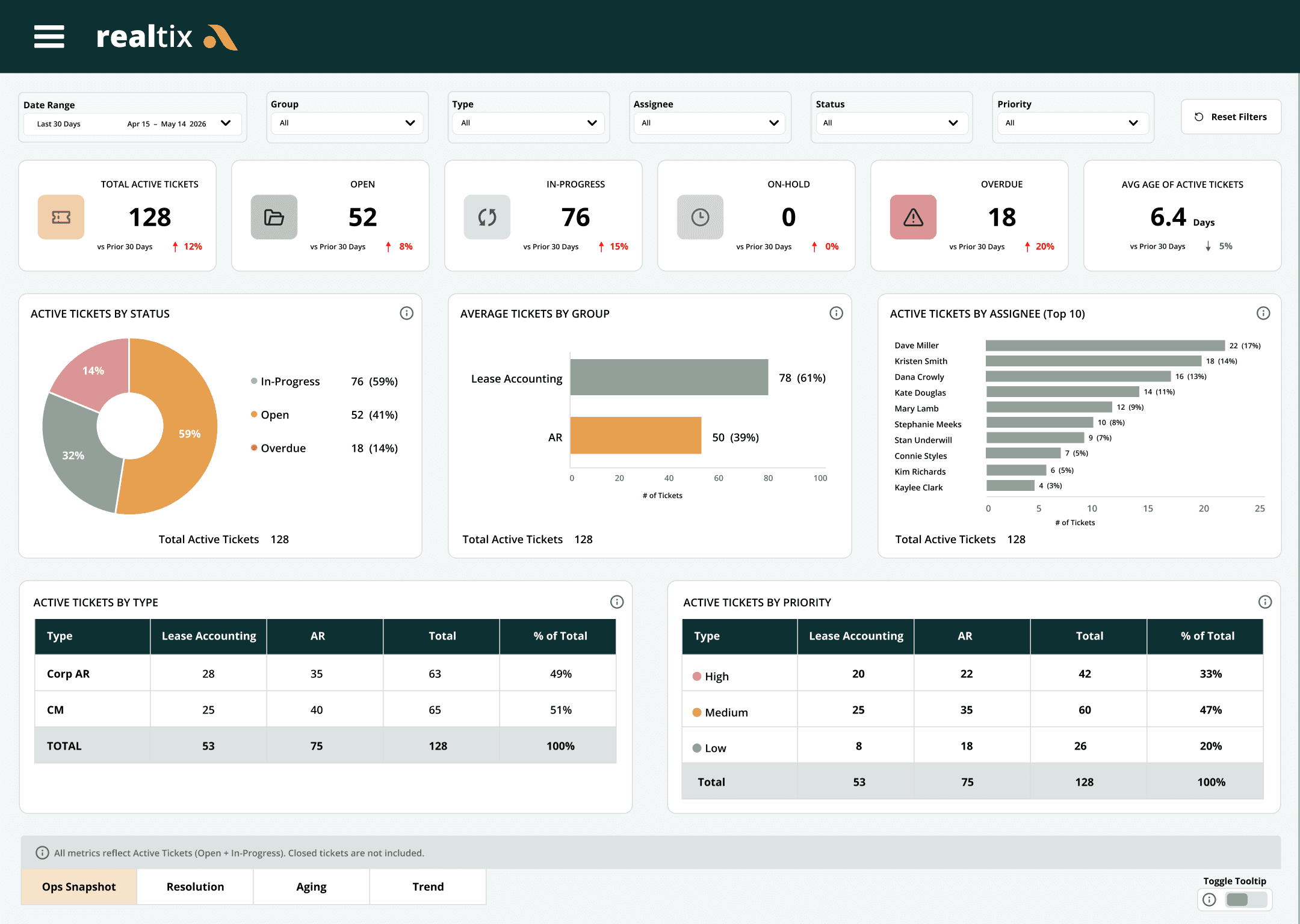
realtix DASHBOARD
Our Dashboards help teams manage ticket volume, aging, ownership, SLA performance, routing activity, and resolution trends. Leaders can see what is moving, what needs attention, where follow-up is getting stuck, and how requests are being handled across teams.
Overview
See open, active, aging, and recently closed tickets across teams, request types, or client workflows from one dashboard view.
AI KNOWLEDGE BASE
realtix captures every resolution and builds a structured knowledge base your team can search, reference, and apply, so the same question never slows you down twice.
AI KNOWLEDGE BASE
 Resolved ticketsClosed requests with history, status, and outcomes.
 Prior questionsRecurring questions from customers or internal teams.
 Team responsesApproved answers, notes, and follow-up context.
 Process stepsThe work performed to reach the final resolution.
AI KNOWLEDGE LAYER
Use ticket history to surface answers, organize knowledge, and support better guidance over time.
 User guidesTurn repeated workflows into clearer process guidance.
 Help articlesCreate searchable answers from approved support history.
 Suggested answersHelp teams respond faster with reusable context.
 Help deskMake answers accessible to internal teams or customers.
CONNECTED TO realserv
Every request follows a clear path, from first contact to final resolution, with full visibility at every step.
Explore Our ProductsWork starts as an email, form, question, issue, or follow-up.
The request is captured as a trackable ticket in realtix.
The ticket is routed to the right team, service group, or support model.
An owner is assigned with visibility, notes, and accountability.
Work is completed, status is updated, and the activity history is preserved.
CONNECTED REALSERV PRODUCTS



Enterprise-ready. Secure by design. Built for your business. If your team is managing important requests through shared inboxes, manual trackers, or scattered follow-up, realtix can help bring structure, visibility, and reporting to the work.